
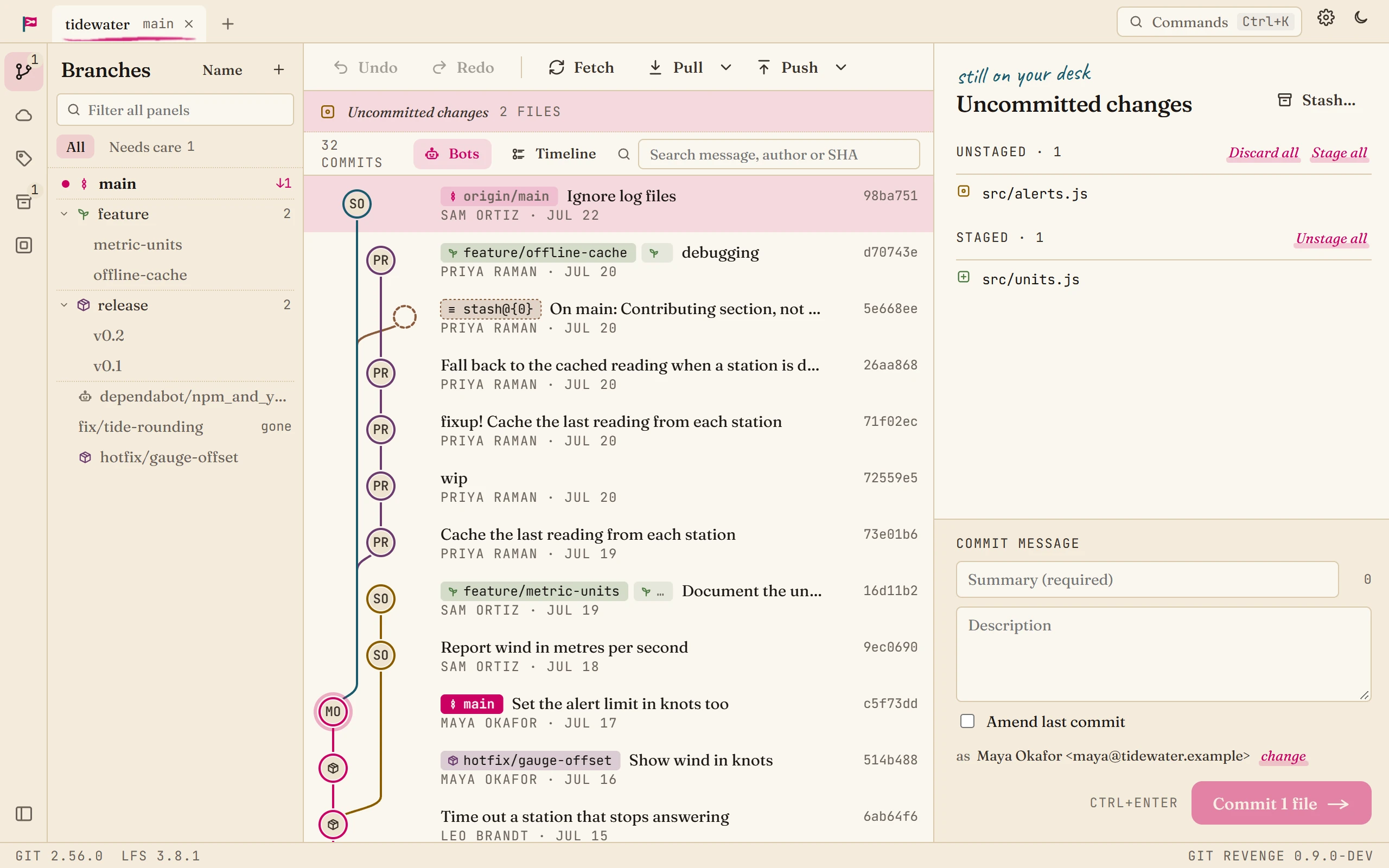
Git Revenge is a desktop git client that stays fast on huge repositories. Point it at the Linux kernel's 1.5 million commits and the first rows of the graph are ready in about 415ms. It drives the git you already have installed, with no accounts, cloud features or AI, and it's free under Apache-2.0. It runs on Windows and macOS, with Linux arriving in 0.10.0.
Why I wrote another git client
Git clients already exist, and I've used several. GitKraken is the one I was reacting to, and my original brief is short enough to quote nearly in full:
A trimmed clone of GitKraken with a backend in Go. It should support most features of GitKraken, without AI tools, Launchpad, or cloud based items. My goal is an easy to use, powerful, fast git client that can be used on multiple repos, including some that are very large.
That's the whole origin story. I wanted the graph and the everyday workflow, and I didn't want a client that keeps growing in directions I don't use. GitKraken's current Pro plan lists AI commit messages, AI merge conflict resolution, AI branch explanations and a weekly credit allowance. Plenty of people want that. I don't. I want to see my repository, do my git and get on with my day.
Those preferences became hard rules in the project plan. AI features, cloud features and hosting integrations are listed as non-goals, so I can't talk myself into them later at 11pm.
What it does
The feature list is long. These are the parts I care about:
- The graph loads rows just ahead of where you're scrolling and draws them on a canvas, so memory follows how far you've scrolled instead of how big the repo is.
- It shells out to your installed
git(2.40 or newer), so your config, hooks, credential helpers, SSH agent and signing behave the way they do in a terminal. Anything you do in a terminal shows up in the app. - You can stage files, hunks or single lines. Stash, merge, rebase, cherry-pick, reset and revert are all there, with undo and redo.
- For digging through history, there's interactive rebase, a 3-pane conflict tool, file history, blame, the reflog, git notes and signature badges.
- Next to unified or split diffs, files can render as previews: Markdown, images, CSV, JSON, YAML, TOML, LaTeX, Mermaid and PDF.
- Branches get kinds like Trunk, Release and Bot, so you can hide the noise. You can also clean up merged branches and restack stacked ones.
- Sprint insights show what shipped and what's stuck, computed from the repository alone, with Markdown and CSV exports. I'm a Scrum Master, so yes, this one is self-indulgent.
The only request it makes on its own is an update check against GitHub Releases, and you can turn that off.
The numbers
"Fast" is a cheap word, so I ran the project's performance check while writing this. It ran against a local clone of the Linux kernel with 1,503,174 commits and a commit-graph file, on my Windows desktop (a 16-thread i9), at commit 0cc7e60.
| Measurement | Result | Target |
|---|---|---|
| First 100 graph rows | 415ms | under 1s |
| Reading a 100-row window while scrolling | 1.2ms average, 7ms worst | under 16ms |
| Search for "fix" (251,514 matches) | 156ms | none set |
status, warm | 298ms | under 500ms |
| Heap after loading all history | 426MB | under 500MB |
| Full history load and layout | 16.2s | none set |
| Jump to the oldest commit, from cold | 14.7s | none set |
Every target passed. A few notes on reading those numbers:
- This measures the Go backend, so it doesn't time pixels reaching the screen. A 7ms worst case leaves room inside a 60fps frame, which is the goal.
- That heap number is the worst case, with all of history loaded. You won't load everything in normal use. At the first read-ahead pause, 30,000 rows in, the heap was 35MB.
- To get first-screen speed like this on your own big repo, run
git commit-graph write --reachableonce. Without that file, git has to walk all of history first.
How it compares
This is the part where authors tend to cheat, so here's my rule: I haven't benchmarked the other clients side by side, so there's no speed column and I won't claim wins I haven't measured. The fair test is your own biggest repo. Open it in Git Revenge and whatever you use now, and see which one you'd rather scroll. If you write up the results, I'd love to see them.
Prices and platforms come from each vendor's site as of November 5, 2026. Check before you buy, since these change.
| Client | Platforms | Cost | Source | Its strong suit |
|---|---|---|---|---|
| Git Revenge | Windows, macOS. Linux from 0.10.0 | Free | Apache-2.0 | Huge repos, fully local, deep history tools at no cost |
| GitKraken Desktop | Windows, macOS, Linux | Free for local and public repos, paid for private remotes | Closed | PR workflows, built-in terminal, AI if you want it |
| Fork | Windows, macOS | $59.99 once | Closed | A one-time purchase with a friendly UI |
| Sublime Merge | Windows, macOS, Linux | One-time personal license with 3 years of updates, or $75 per user per year for business | Closed | Keyboard-driven flow |
| Tower | Windows, macOS | From $69 per user per year | Closed | Company support and team features |
| Sourcetree | Windows, macOS | Free | Closed | Atlassian shops |
| GitHub Desktop | Windows, macOS | Free | MIT | Simplicity and GitHub integration |
| SmartGit | Windows, macOS, Linux | Free for hobby use, commercial from $5 per user per month | Closed | Cross-platform teams with commercial licensing |
| lazygit | Windows, macOS, Linux | Free | MIT | Terminals and SSH sessions |
What Git Revenge does well
It's free and open source with no feature gate on private repos, which only GitHub Desktop and lazygit in that table can also say. You get interactive rebase, a 3-pane conflict tool and blame without paying anyone or signing in anywhere. Compared with GitHub Desktop, it goes much deeper on history work and isn't built around one host. Against lazygit, you get a graphical commit graph and rendered previews.
The local-only stance is easy to verify, because you can read the code. If your employer is twitchy about git tools with accounts and AI features, that may matter more than anything else on this page.
Trying it is also low risk. It runs plain git underneath and doesn't change your repo's format, so if you stop using it there's nothing to migrate. Your repository won't know the difference.
Good to know before you install
- No pull requests, on purpose. There's no GitHub, GitLab, Bitbucket or Jira integration, and there won't be. If you do your reviews inside your git client, this isn't your client.
- It's pre-1.0. Releases come often. If something breaks, I want to hear about it.
- The Windows installer isn't signed. SmartScreen will warn you, and you'll have to click through. This is purely about money. Signing costs a lot and funding is limited, but if the project gets enough support I'll consider it. The macOS build is signed and notarized.
- Linux packages start with 0.10.0. That release is at release candidate as I write this, with
.deband.rpmpackages for x86-64. I've tested under WSL, so reports from real Linux desktops are very welcome. - It uses a system web view. It's a Wails app, which keeps the installer around 11MB on Windows, and the interface is web technology rather than native controls.
So which should you use?
- You have a huge repo, you want nothing leaving your machine, or you'd rather not pay for private repos: try Git Revenge.
- Your work centers on pull requests, or you want AI in the client: GitKraken.
- You want free and simple, and you live on GitHub: GitHub Desktop.
- You work over SSH or never leave the terminal: lazygit.
- You need a graphical client on Linux before 0.10.0 lands: Sublime Merge, SmartGit or GitKraken.
That first group is who I built this for, and I'm in it.
"No AI" has a footnote
I built this with Claude Code. A lot of the code and many of the pull requests came out of working with it, and the commit history shows it. I made the decisions and I own the bugs, but I'm not going to put "no AI" on a homepage and let you assume it was handwritten.
"No AI" describes the product: nothing in the app calls a model, and none of your code goes anywhere. I don't see a conflict there, since I've already written about using AI as a tool. If it's a dealbreaker for you, that's a fair position, and I'd rather you know now.
Trying it
You'll need git 2.40 or newer, plus git-lfs if you use LFS. Installers are on the releases page, and the user guide starts with a tour of the window.
If it breaks, open an issue and tell me about your repo. A bug report from a repository that doesn't look like mine is the most useful thing anyone can send right now.
If you'd like to chip in
The project has a GitHub Sponsors page. Running Git Revenge costs a little, mostly the domain and Apple's yearly developer fee. Signing the Windows installer would be the first big expense.
There's no paid tier, and nothing is locked behind sponsoring. The app won't nag you, and it never will. My last sponsorship experiment brought in two donations and $6 over three years, so my expectations are well calibrated. If the tool saves you an afternoon and you feel like saying thanks, that's what the link is for. If your company runs on a giant monorepo and this helps, I'd be glad to hear from you.
If you'd rather not spend anything, that's fine. Use it, or tell a friend with a repo that makes their current client cry.